

システムメトリックス株式会社
名古屋市中区丸の内 1-15-20 ie丸の内ビルディング 11F
Tel. 052-232-4040 / お電話による受付時間 平日 9:30-17:00(土日祝休)
© 2026 System Metrix Co., Ltd. All Rights Reserved.
Created Date:2021.08.23
Updated Date:2026.05.07
AutoCAD 2026 System Requirements & How to Check PC Specs
Nothing kills productivity faster than a sluggish, unresponsive CAD interface. If your drafting software is lagging, it doesn't matter how powerful the application is—your workflow will suffer. Before upgrading to the latest version of AutoCAD, you need to ensure your workstation is up to the task.
In this guide, we cut straight to the chase. We will outline the exact AutoCAD 2026 system requirements, explain why each hardware component matters for your drafting performance, and show you exactly how to check your current PC's specifications.

実は、AutoCAD は標準で JWW 形式に対応していません。
DARE ONE なら、JWW から DWG / DXF への高精度な変換がブラウザ上で今すぐ無料で完了!
拡張子の互換性に悩まず、スムーズに作図作業へ移りましょう。

If you want to run AutoCAD 2026 smoothly, your machine needs to meet or exceed the benchmarks set by Autodesk. Here is the official breakdown:
| Hardware | Minimum Requirement | Recommended Specs |
|---|---|---|
| OS | 64-bit Microsoft® Windows® 11 or Windows 10 | 64-bit Microsoft® Windows® 11 or Windows 10 |
| Processor (CPU) | 2.5–2.9 GHz (8 logical cores) | Base: 3.0+ GHz / Turbo: 4.0+ GHz |
| RAM | 8 GB | 16 GB (32 GB for large datasets) |
| Storage | 10.0 GB free disk space | 10.0 GB free disk space (SSD highly recommended) |
| Graphics (GPU) | 2 GB GPU with 29 GB/s Bandwidth (DirectX 11) | 8 GB GPU with 106 GB/s Bandwidth (DirectX 12) |
| Additional | .NET 8 | .NET 8 |
If you are not a hardware expert, looking at gigahertz and bandwidths can be confusing. Here is a practical breakdown of how these components impact your daily CAD work.
AutoCAD 2026 is strictly optimized for 64-bit versions of Windows 11 and Windows 10. Older, unsupported systems like Windows 8.1, Windows 7, or any 32-bit OS simply will not run the software.
Think of the CPU as the brain of your workstation. AutoCAD is historically a single-core heavy application, meaning the base clock speed (GHz) matters immensely for drafting commands. However, the 2026 version increasingly leverages multi-threading (requiring 8 logical cores) for background tasks and rendering. The higher your GHz, the faster your CAD processing.
RAM acts as your digital workbench. A larger workbench allows you to open more applications and larger files simultaneously without freezing. While 8 GB is the absolute minimum, opening massive DWG files or 3D models with insufficient RAM will cause system crashes. For professional use, 16 GB is the standard, but 32 GB is strongly recommended if you handle complex, large-scale assemblies.
The 10.0 GB requirement refers strictly to the free space needed on your drive to install the software, not your total drive size. While traditional HDDs technically work, upgrading to a Solid State Drive (SSD) is mandatory for modern CAD. An SSD drastically reduces software launch times, file load times, and auto-save delays.
Your GPU (Graphics Processing Unit) dictates how smoothly you can pan, zoom, and orbit around your drawings. While basic 2D drafting requires minimal GPU power (2 GB), working with 3D models or multiple high-resolution monitors demands a robust graphics card. Aim for the recommended 8 GB GPU to prevent screen tearing and visual lag.
AutoCAD relies on Microsoft’s .NET framework to run its background architecture. AutoCAD 2026 has transitioned from the older .NET Framework 4.8 to the newer, high-performance .NET 8. If it is not already on your system, you must download and install it from Microsoft's official website before launching the CAD software.
Not sure what hardware is inside your current machine? You can check your system specifications in less than a minute using built-in Windows tools.
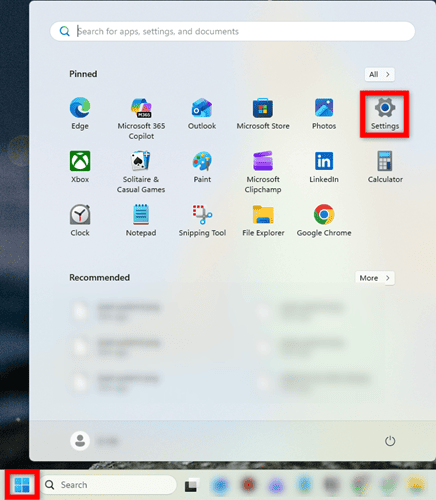
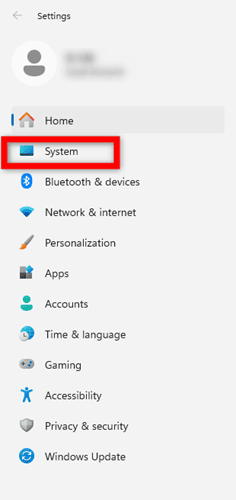
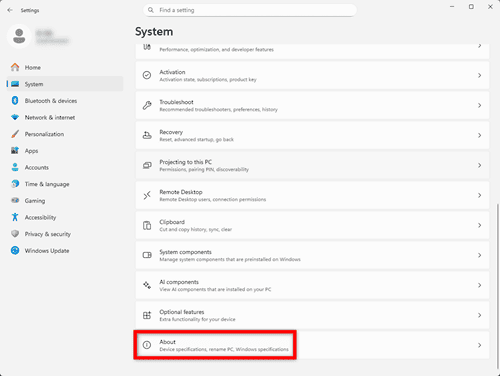
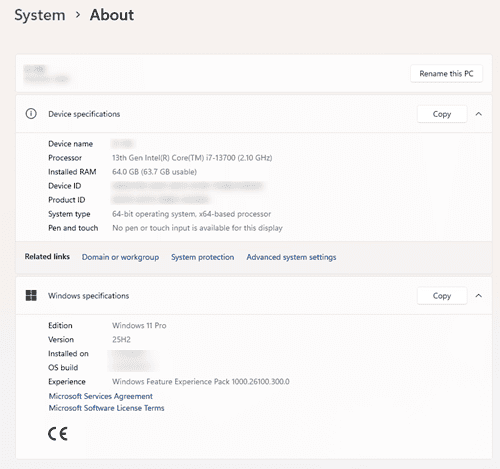
To verify your graphics card (GPU), type dxdiag into the search bar next to the Start menu and open the DirectX Diagnostic Tool.
Upgrading your workstation to meet AutoCAD 2026 system requirements can be a massive financial investment. If your current PC is struggling to open heavy CAD files or process complex format conversions, you don't necessarily need to buy a $3,000 workstation right away.
Meet DARE: Your Cloud-Based CAD Conversion Solution
Instead of forcing your local CPU and RAM to grind through heavy file conversions, let the cloud do the heavy lifting. DARE is a professional, lightning-fast B2B CAD conversion cloud service designed for engineers and designers.
Whether you need to convert PDF to DWG with layers intact, salvage garbled text in DXF files, or seamlessly translate STEP files without crashing your local machine, DARE processes it all securely on high-performance cloud servers.
Stop wrestling with hardware limitations and let the cloud work for you.
Try DARE's Free Cloud Conversion Tools Today

There are times when you might need to run CAD on a computer that falls short of AutoCAD's required specifications.
In those situations, opting for an AutoCAD-compatible CAD alternative is a great choice.




![[Free] Convert raster images to CAD data in just one step.](/en/images/recommendService/dareRaster.png)
![[Free] View DWG, JWW, and 3D drawings easily on your smartphone or tablet! [DARE BOX Mobile recommended]](/en/images/recommendService/dareBoxMobile.jpg)
![Free CAD drawing conversion for everyone! What exactly is DARE? [Supports DWG, JWW, and many other formats]](/en/images/recommendService/dare.jpg)










