Created Date:2026.05.08
Updated Date:2026.05.11
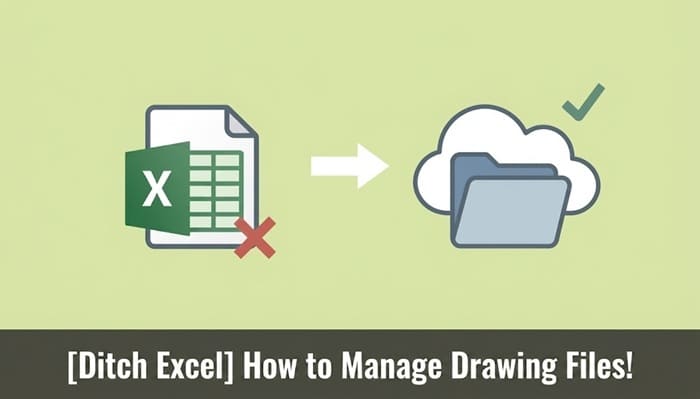
Managing CAD files with manual Excel spreadsheets and generic file servers often leads to inefficiencies and administrative overhead for engineering teams. To maintain a single source of truth and reduce version control errors, design teams are increasingly transitioning to purpose-built, cloud-based CAD file management tools.
If your team is experiencing workflow bottlenecks due to misplaced DWG revisions or friction when sharing large files externally, it may be time to reevaluate your data management strategy.
>> Break free from Excel: Manage drawings with DARE BOX+ (Try for free)

DARE はブラウザだけで DWG・DXF・JWW・PDF などを相互変換・バージョンダウンができる無料サービスです。
ソフトのインストールも、面倒な待ち時間も不要。今すぐ変換して業務を再開しましょう!

Managing CAD drawing files involves stricter technical requirements than organizing standard office documents. Conventional workflows often struggle to keep up with the realities of iterative design, leading to three primary challenges.
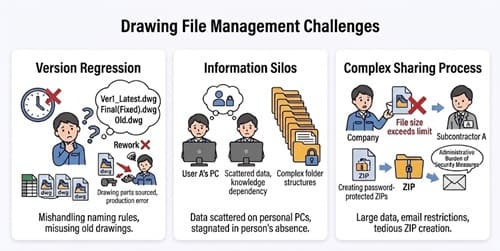
Design processes require continuous revisions based on client feedback or internal specification changes. When engineers rely on manual naming conventions—such as appending "Latest," "Final," or "Rev_Date" to file names—maintaining structural consistency becomes difficult as the project scales.
Without a systematic version control protocol, teams risk reverting to older iterations. Releasing an outdated DWG to manufacturing or a subcontractor can result in unnecessary rework, schedule delays, and increased material costs.
Are active project files stored strictly on individual local drives? Or are they nested deep within complex legacy server structures?
When file storage becomes highly localized or dependent on specific individuals (data silos), sudden absences or department transfers can create severe bottlenecks. CAD data is a critical corporate asset; a lack of immediate, centralized access can compromise business continuity.
Sharing files with clients or external contractors using standard email often introduces technical friction. DWG, STEP, and highly detailed PDF files frequently exceed standard email attachment limits. Resorting to password-protected ZIP files or generating manual links from consumer-grade cloud storage adds administrative overhead to a designer's workflow and can create security and access compliance issues.
Ready to secure your intellectual property with proper access controls?
To mitigate these issues, CAD managers often establish internal folder rules and tracking logs. However, generic tools lack the native functionalities required for specialized CAD workflows.
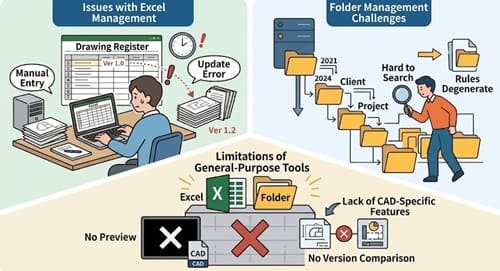
Tracking project drawings and revision histories via Excel is accessible, but it relies entirely on manual data entry. Every time a drawing is updated, the log must be manually amended. This often leads to missed updates, causing a discrepancy between the tracking document and the actual project files.
Organizing servers by rigid rules (e.g., "Year > Client > Project > Engineer") functions well initially, but deep folder trees can eventually compromise file searchability. When non-standard files do not fit the established rules, they are often misplaced, causing the system to degrade over time.
Standard Windows Explorer or generic cloud platforms cannot natively generate previews for DWG or DXF files without third-party plugins, nor do they offer geometric comparison tools to verify granular changes between versions.
To improve operational efficiency and maintain design quality, engineering teams are adopting dedicated data management solutions. DARE BOX+ is a specialized cloud service developed explicitly to manage CAD drawing files smoothly.
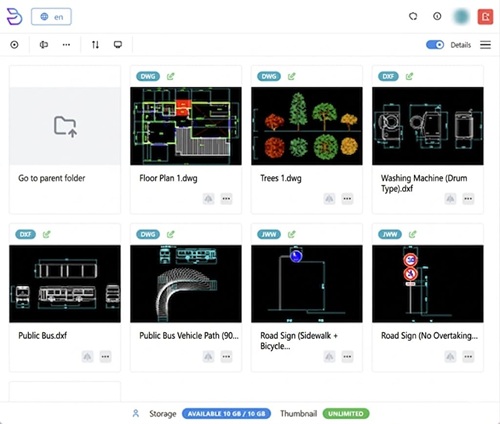
Generic cloud storage requires users to download files and launch heavy local CAD software simply to verify the content. DARE BOX+ generates immediate browser-based thumbnails and previews for DWG, DXF, and various other file extensions. This allows users to visually identify required drawings efficiently, even from workstations without native CAD applications installed.
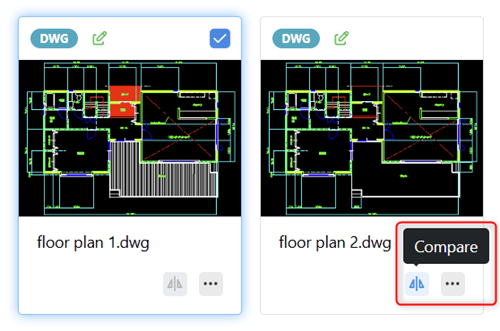
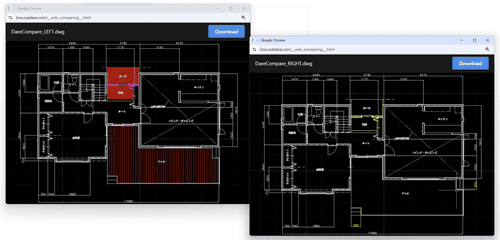
Reduce reliance on manual visual checks. DARE BOX+ features a built-in drawing comparison tool that overlays different iterations of a file, highlighting precise geometric modifications. This allows engineers to systematically verify changes, ensuring the team is working from the verified "latest version" and minimizing the risk of version regression.
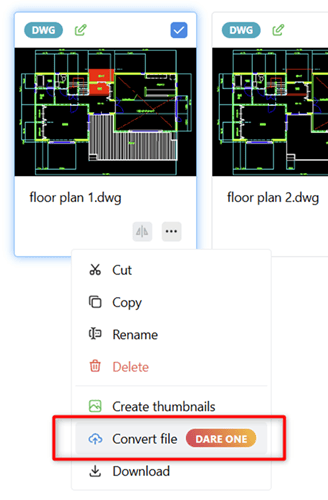
For workflows requiring format conversions, combining DARE BOX+ with DARE ONE+ enables a highly efficient process. While DARE BOX+ is built for management, it features a dedicated upload menu designed to work in tandem with DARE ONE+, a specialized data conversion tool. By utilizing both services together, users can seamlessly manage files and process conversions without the hassle of constantly downloading and re-uploading files locally.
Implementing a dedicated CAD management tool streamlines operations across departments and external stakeholders.
As a cloud-native platform, DARE BOX+ enables secure access from tablets or smartphones. Engineers can verify dimensions on the manufacturing floor or review specifications on-site without relying on physical paper plots.
If your organization already utilizes platforms like Box or Dropbox for general document storage, DARE BOX+ integrates directly with these services. This provides advanced CAD capabilities while maximizing existing IT infrastructure.
DARE BOX+ eliminates the need for complex PDM server installations. It offers scalable, per-user licensing, deploys instantly via standard web browsers, and supports Single Sign-On (SSO) to align with enterprise security governance.
A: No. Existing folder structures can be mapped into the cloud environment. For larger teams, a phased migration is recommended: begin by transferring active or new projects first to minimize disruption to ongoing daily operations.
A: Standard email attachments often lead to version confusion and misplaced files. By sharing via DARE BOX+, external partners can reliably access the latest verified data. This prevents miscommunication, makes it much easier for administrators to grasp the current status of project files, and enhances security through supported Single Sign-On (SSO) features.
A: DARE BOX+ itself is strictly a file management service and does not have the capability to convert or digitize scanned paper drawings. To achieve this, you need to use DARE ONE+, which handles processes like raster-to-vector conversion. By combining the two, you can digitize your paper drawings using DARE ONE+, and then upload the resulting CAD data to the cloud for management.
A: No. DARE BOX+ is delivered as a fully managed SaaS platform. Deployment requires only an internet connection and a standard web browser.
Relying on manual spreadsheets and generic server structures to manage CAD drawing files introduces unnecessary risk and administrative load. It can lead to fragmented data, version discrepancies, and reduced operational efficiency. Upgrading to a specialized tool provides a logical framework for securing your design data.
Centralize your assets, eliminate data silos, and allow your engineers to focus on design rather than manual file administration.
Ready to streamline your engineering workflow? >> Request an Enterprise Demo
Evaluate the platform with your own DWG files: >> Start Your 7-Day Free Trial Now