

システムメトリックス株式会社
名古屋市中区丸の内 1-15-20 ie丸の内ビルディング 11F
Tel. 052-232-4040 / お電話による受付時間 平日 9:30-17:00(土日祝休)
© 2026 System Metrix Co., Ltd. All Rights Reserved.
Created Date:2026.05.08
Updated Date:2026.05.12
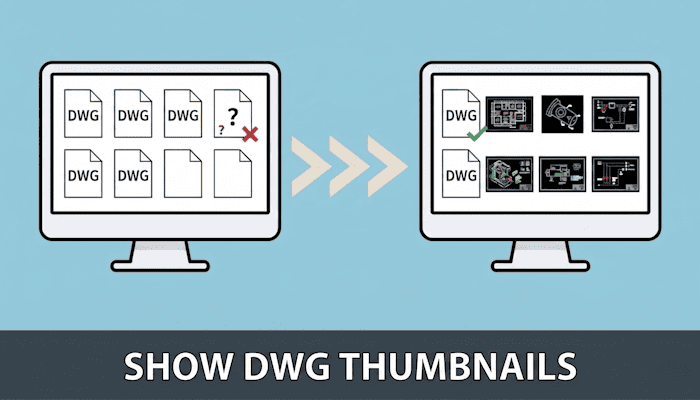
You moved your engineering team to Box or Dropbox to speed up collaboration — then found you couldn't preview DWG thumbnails anywhere. Instead of an efficient cloud workflow, your team wastes hours downloading massive CAD files one by one just to check what's inside.
The good news: you don't need to abandon your current storage. A single integration adds instant DWG thumbnail previews to Box or Dropbox without touching your folder structure or migrating a single file.
>> Try DARE BOX+ Free — No Installation Required

DARE はブラウザだけで DWG・DXF・JWW・PDF などを相互変換・バージョンダウンができる無料サービスです。
ソフトのインストールも、面倒な待ち時間も不要。今すぐ変換して業務を再開しましょう!

General-purpose cloud platforms are excellent for Office documents, PDFs, and standard images. But DWG, DXF, and other engineering CAD formats contain complex geometry data that requires a dedicated rendering engine — something Box and Dropbox simply don't include by default.
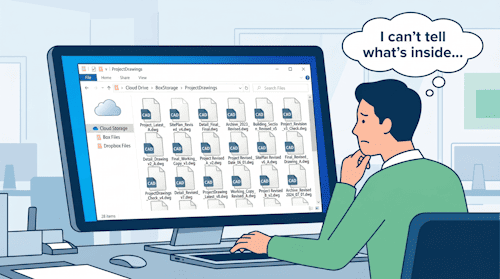
When you can't preview DWG thumbnails in Dropbox or Box, a familiar set of problems takes hold:
bridge_v3_FINAL_revised2.dwg variants becomes a frustrating guessing game.The larger the project, the more these small delays compound into significant time loss.
Some teams export a PDF from CAD software and upload it alongside the DWG. While PDFs preview perfectly in any cloud interface, this approach creates a double-management risk. Every revision requires re-exporting and re-uploading the PDF. When someone forgets — and at scale, someone always does — the PDF shows v2 while the DWG is at v5. Version mismatches at that level can lead to costly errors on the production floor.
Desktop sync apps let engineers pull files to their local machine and open them in a local CAD viewer. But syncing full project directories consumes local storage quickly. More critically, this approach excludes subcontractors and field staff on mobile devices without CAD software installed. You solve one problem and introduce three more.
Neither workaround addresses the root cause: your cloud storage has no CAD rendering layer.
DARE BOX+ is a browser-based CAD management tool that acts as a specialized visual layer over your existing cloud storage. It does not move your data — it renders it where it already lives.
Link your Box or Dropbox account, and DARE BOX+ automatically generates visual thumbnails for your DWG and DXF files directly in your web browser. Your existing folder structure, IT conventions, and team workflows stay exactly as they are. No data migration. No re-training.
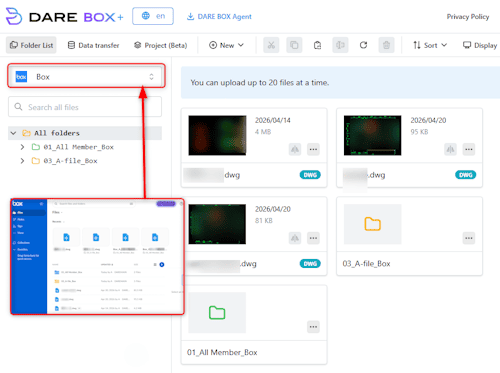
Beyond thumbnails, you can click into any file and view the full CAD drawing in-browser — no CAD software license, no local CAD viewer, no heavy software download. Works on any PC, Mac, tablet, or smartphone with an internet connection.
A site manager on the construction floor can pull up the latest structural sheet on their iPhone and get the answer they need without calling the office.
Dealing with multiple drawing versions? The built-in diff tool overlays two revisions of the same file and highlights design changes visually — added geometry, removed elements, updated dimensions. Instead of scanning two sheets manually side by side, reviewers see what changed at a glance. For teams managing complex multi-sheet projects, this can significantly reduce the time spent on revision QA.
If your workflow involves format conversion — DWG to DXF, DWG to PDF, or other engineering standards — DARE BOX+ connects directly with DARE ONE+. Trigger conversions from within the cloud interface, with no download-convert-reupload loop required.
Ready to see your DWG files as thumbnails right now?
>> Start Your 7-Day Free Trial of DARE BOX+
| Situation | Before DARE BOX+ | After DARE BOX+ |
|---|---|---|
| Browsing drawings | Filename guesswork only | Visual thumbnail grid — find by sight |
| Checking file content | Download every candidate file | In-browser view, no software needed |
| Version control | PDF/DWG version mismatches | Single source of truth stays in Box/Dropbox |
| Field access | Blocked without CAD software on device | Any browser, any device, anywhere |
| Revision review | Manual side-by-side comparison | Diff overlay highlights design changes visually |
Site managers, inspectors, and subcontractors can view the latest DWG thumbnails and full drawings on any device from the job site — without needing a CAD license or IT support.

Visual search means your engineers find the right drawing immediately. The cumulative time saved from eliminating unnecessary downloads and version confusion adds up quickly across a full project lifecycle.
Your files stay in Box or Dropbox. DARE BOX+ adds the viewing layer your existing storage was never built to provide, without creating a second system to maintain.
Q: Do I need to migrate my DWG files out of Box or Dropbox?
No. Your files stay exactly where they are. DARE BOX+ connects to your existing storage via OAuth and renders thumbnails and browser views on top of your current folder structure — nothing is moved or duplicated.
Q: Does the viewer require AutoCAD or any other CAD software?
Not at all. DARE BOX+ is entirely browser-based. Anyone with access permissions can view DWG files on any PC, Mac, tablet, or smartphone without a local CAD viewer installed.
Q: Which CAD file formats are supported?
DWG and DXF are the primary supported formats. Integration with DARE ONE+ extends the workflow to additional formats including PDF and STEP for teams with conversion-heavy pipelines.
Q: Can I test it with my own company's actual DWG files before committing?
Yes. The 7-day free trial lets you connect your existing Box or Dropbox account and verify thumbnail rendering and browser viewing with your real project data — at no cost and no obligation.
Standard cloud storage was never designed for CAD data. The missing piece isn't a new storage platform — it's a CAD-native rendering layer over the one you already use.
DARE BOX+ adds instant DWG thumbnail previews, browser-based full drawing views, and visual revision comparison to your existing Box or Dropbox setup. Keep your folder structure, your storage vendor, your workflows — and finally see what's inside your files without downloading them.
Ready to streamline your CAD management?
>> Contact Us to Discuss Enterprise Plans
Want to see it in action right now?
>> Start Your 7-Day Free Trial of DARE BOX+


![[Free] Convert raster images to CAD data in just one step.](/en/images/recommendService/dareRaster.png)
![[Free] View DWG, JWW, and 3D drawings easily on your smartphone or tablet! [DARE BOX Mobile recommended]](/en/images/recommendService/dareBoxMobile.jpg)









