Created Date:2026.04.27
Updated Date:2026.05.12
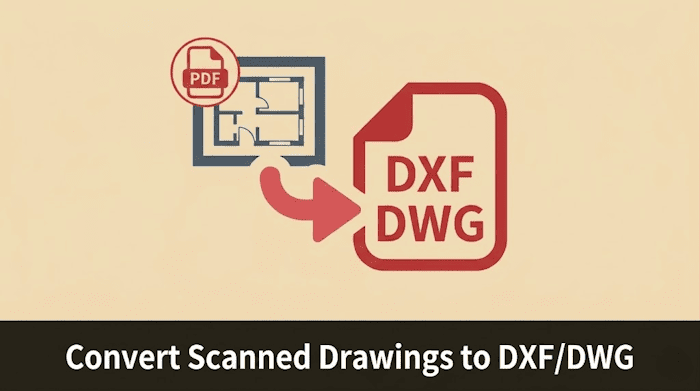
You scanned the drawings. You saved them to the server. And then, when a retrofit project came up, your team spent hours retracing every line in AutoCAD from scratch.
Sound familiar? Scanning is not digitization. It's archiving. Real digitization means your historical drawings are editable, reusable, and ready to work with in your CAD software — right now.
Dealing with uneditable scanned PDFs?
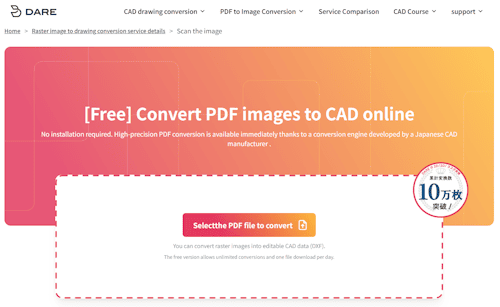
DARE converts raster drawings (PDF, PNG, TIFF, JPG) into fully editable DWG/DXF files — directly in your browser, no software installation required.
過去の紙図面をスキャンしただけの画像データでは、CADで修正・再利用ができません。
DARE Scanner は、AI技術を用いてラスター画像をベクターCADデータへ自動変換します。
手書きの図面資産をデジタル化し、すぐに現場で活用できる状態へアップデートしましょう。
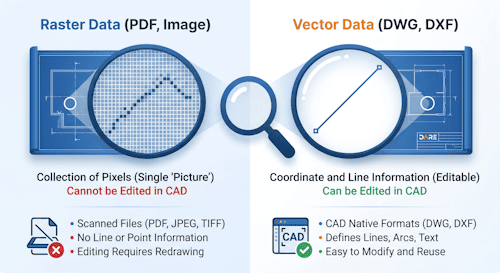
Most engineering and design teams reach a familiar stopping point: drawings are digitized as image files (PDF, TIFF, JPEG), stored in a shared drive or document management system, and declared "complete."
But when a real task arrives — a building retrofit, a machinery update, a plant expansion — the workflow falls apart:
The root cause is the difference between raster data (pixels) and vector data (coordinates). A scanned drawing is a photograph of your engineering work. CAD software needs vector geometry — lines, arcs, text objects defined by coordinates — to function.
Getting from raster to vector is the step most teams skip. And it's where DARE comes in.
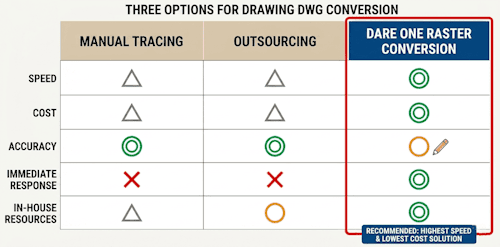
An operator opens the scanned image as an underlay in AutoCAD or similar software, then traces every line, arc, and annotation by hand.
Where it works: Complex, high-tolerance drawings where precision is non-negotiable and the team has the time to invest.
Where it breaks down: A single A1-size drawing can take several hours for an experienced CAD operator. For a backlog of hundreds of legacy drawings, this approach consumes engineering capacity that should be spent on new design work — not copying old drawings pixel by pixel.
Specialized conversion vendors accept raster files and deliver DWG or DXF output, handled by their own team.
Where it works: Large-volume, one-time digitization projects where turnaround time is flexible.
Where it breaks down: Per-drawing costs range from tens to hundreds of dollars depending on complexity and volume. More critically, turnaround time is measured in days or weeks — which rules out outsourcing for any urgent or ad-hoc request. If an engineer needs a 20-year-old drawing made editable by tomorrow morning, a bureau can't help.
Cloud-based tools use machine learning to analyze raster images and reconstruct them as vector geometry — automatically converting lines, shapes, and text into editable CAD objects.
Where it works: The vast majority of engineering, architectural, and manufacturing drawings where speed and cost matter. Ideal for both large-scale digitization backlogs and one-off urgent conversions.
Where to watch out: Conversion accuracy depends on the quality of the source scan. Heavily degraded originals (very low DPI, severe water damage) may require some manual correction after conversion — but far less than starting from scratch.
For most teams, AI conversion plus targeted manual cleanup is dramatically faster and cheaper than either alternative.
Generic PDF-to-DWG converters trace the black pixels in an image and output them as polylines. The result looks like a drawing but behaves like one drawn by a machine with no understanding of what it's looking at:
DARE uses a purpose-built AI engine trained on engineering drawings, not generic document images. The difference shows up immediately when you open the converted file in AutoCAD:
DARE's AI identifies text regions in the scanned image and converts them to real, editable text objects in the DXF output. Double-click a dimension in AutoCAD after DARE conversion, and you can type a new value — because it's a text entity, not a cluster of lines.
This is the feature that most separates professional conversion tools from consumer-grade alternatives.
Standard tools trace the outer edge of a line, producing two parallel lines where there should be one. DARE extracts the centerline of each stroke and outputs a single vector line. The result: wall centerlines, pipe centerlines, and structural axes come out as single entities that behave correctly in any downstream CAD workflow.
Faxed drawings, blueprints, hand-annotated prints, and multi-generation photocopies all carry visual noise. Because noise can be traced as geometry, the best defense is at scan time: clean the sheet, scan in black-and-white at 400–600 dpi, and remove any leftover artifacts in your CAD software after conversion.
| Input Formats | Output Formats |
|---|---|
| PDF, PNG, JPG/JPEG, TIFF, BMP, GIF | DXF (re-convertible to DWG via DARE 2D) |
Converted DXF files open cleanly in AutoCAD, BricsCAD, ZWCAD, Vectorworks, and any other DXF-compatible application. No intermediate conversion step required.
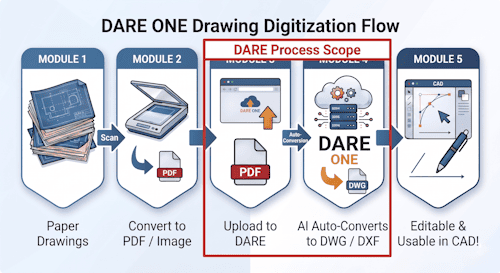
DARE runs entirely in the browser — no desktop installation, no license server, no IT ticket required.
Step 1 — Upload your scanned file
Log in to DARE ONE and select the Raster Conversion tab. Drag and drop your PDF or image files into the upload zone. Batch conversion supports up to 20 files per job.
Step 2 — Let the AI process your drawing
Click Convert. DARE’s AI analyzes the image, extracts geometry and text, and builds the vector output. Most drawings complete in under a few minutes.
Step 3 — Review and download
Preview the converted drawing in the browser before downloading. Spot-check line quality, text recognition, and layer structure. Once satisfied, download the DXF file and open it in AutoCAD or your preferred CAD application.
A free account includes unlimited conversion attempts. Download credits are included in the free tier so you can validate output quality on your own drawings before committing to a paid plan.
The impact goes beyond the conversion task itself.
Legacy drawings become reusable design assets. Instead of retracing a floor plan from scratch for a renovation project, engineers start from the converted DWG and modify only what changed. Weeks of rework become hours.
Ad-hoc requests become self-service. When a field engineer needs a site drawing made editable for a maintenance update, they don't have to wait days for a conversion bureau. They upload, convert, and download — in the same workflow as any other file operation.
Digitization scales without scaling your team. DARE's batch processing and API access mean that converting a backlog of hundreds or thousands of drawings doesn't require proportionally more headcount. The AI does the volume work.
Stop retracing drawings that already exist. DARE converts your scanned engineering drawings into editable DWG-compatible files in minutes — entirely in your browser.
Free to try. No credit card required.
Convert Your First Drawing Free →
Looking for more detail on conversion accuracy, supported formats, or batch processing options?
→ How DARE's AI Engine Converts Scanned Drawings to CAD Data