Created Date:2021.08.12
Updated Date:2025.09.30

Jw_cad is a 2D general-purpose CAD software exclusively for Windows. Anyone can start using it for free right now.
In this article, we will show you how to download Jw_cad.

Jw_cad で保存した JWW や DXF から DWG への変換は文字化けや縮尺ズレが起こりやすく、取引先から「図面が開けない」と指摘されがちです。
DARE なら、JWW → DWG / DXF の変換がたったの1ステップで完了。 高精度変換エンジンがレイアウト崩れを最小限に抑え、あなたの図面をそのままの美しさで届けます。
You will download Jw_cad from its official website.
The official Jw_cad website can be opened by clicking the URL below.
Once you open the Jw_cad site, select 「ダウンロード」 (Download) from the menu.

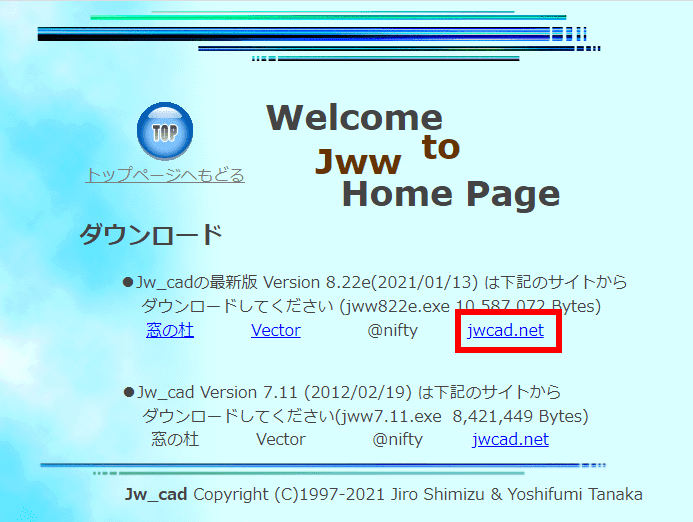
When the download page opens, select a download source.
Here, we will select 「jwcad.net」.
If you select the other options, 「窓の杜」 (Mado no Mori) or 「Vector」, the file will be downloaded from a site other than jwcad.net.
Normally, downloading from jwcad.net is fine, but if you are unable to download successfully, for example during times of high traffic, please try downloading from one of the other sites.
Click on 「jwcad.net」 on the download page.
You will then be prompted to choose a location to save the Jw_cad installer file, 「jwwXXX.exe」 (where XXX is the Jw_cad version number).
Save it to an easy-to-find location, such as your Desktop.
This completes the Jw_cad download.
Next, you will install Jw_cad. For the installation process, please refer to the following article.