システムメトリックス株式会社
名古屋市中区丸の内 1-15-20 ie丸の内ビルディング 11F
Tel. 052-232-4040 / お電話による受付時間 平日 9:30-17:00(土日祝休)
© 2026 System Metrix Co., Ltd. All Rights Reserved.
Created Date:2021.08.26
Updated Date:2026.04.01

Autodesk Fusion 360 remains one of the most powerful and accessible 3D CAD platforms on the market. Whether you are an engineer evaluating software for a business or a hobbyist looking to prototype a personal project, Fusion 360 offers versatile download options to fit your needs.
This guide skips the fluff and walks you directly through the steps to download the Fusion 360 free trial so you can start designing immediately.

Fusion 360 で作成したデータを協力会社や加工現場に渡す際、相手の環境に合わせて形式を整えるのは手間ですよね。
DARE を使えば、書き出した DXF や STEP をブラウザから直接 DWG・JWW に変換できます。
相手が AutoCAD でも Jw_cad でも、これ一つでシームレスな連携が実現します。

Before downloading, determine which license applies to your current workflow. Autodesk offers two distinct "free" starting points:
Follow these quick steps to get the installation file onto your local machine.
Navigate directly to the Autodesk Fusion 360 official page.
Choose your preferred version based on your needs:
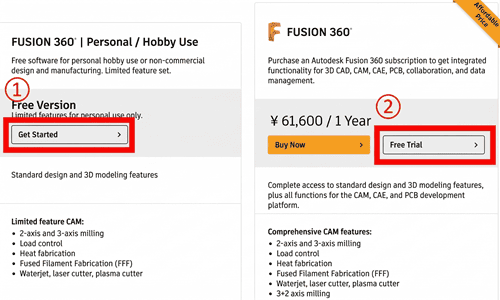
For this guide, we will assume you are downloading the 30-day commercial Free Trial.
Autodesk will prompt you to specify your role. Click the dropdown menu and select the option that best describes your position (e.g., "Business User").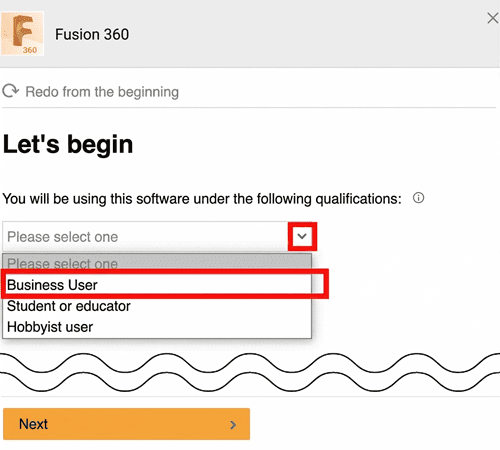
Once selected, click Next.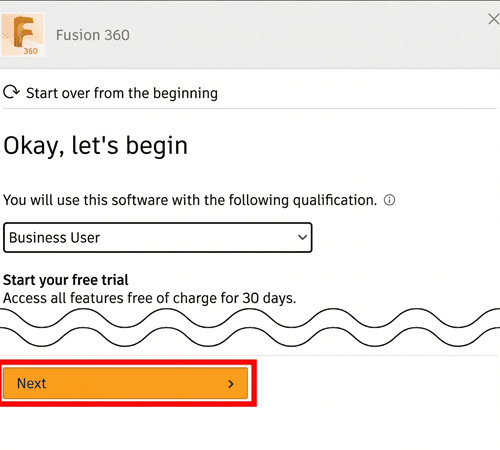
Fill out the required form fields with your contact and company information. Ensure your email address is correct, as Autodesk ties your trial license to this Autodesk Account. Once completed, click Start Trial.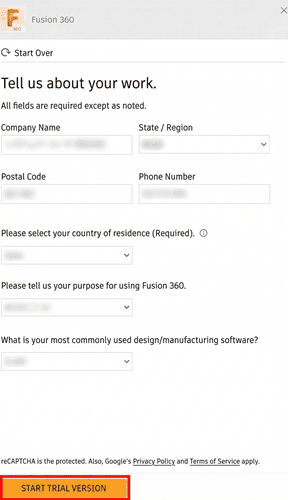
You will see a "Thank you for downloading Fusion 360" confirmation screen, and the installer file will begin downloading automatically.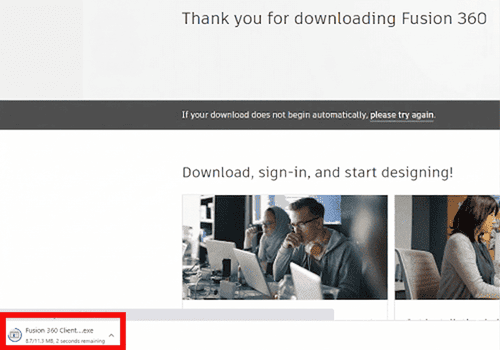
Troubleshooting Tip: If your download does not start within a few seconds, look for the manual override link (usually labeled "please try again" or "click here") to force the download.
Once the download is complete, locate the downloaded file in your system (usually your Downloads folder) and double-click it to begin the installation.
Note: Fusion 360 requires a 64-bit operating system (Windows or Mac). 32-bit systems are not supported.
If you need a detailed walkthrough of the installation and setup process, read our comprehensive guide:
How to Install Fusion 360: A Complete Guide
Getting your CAD software up and running is only half the battle. If you find yourself constantly battling incompatible file formats, garbled text, or missing layers when importing legacy designs from other engineers, you need a reliable conversion tool.
Stop wasting hours fixing broken geometries. DARE provides lightning-fast, highly accurate 2D and 3D CAD file conversions for industry-standard formats like DWG, DXF, STEP, PDF, and more.
Create a free account today and streamline your engineering workflow in seconds.
Try DARE's Free 3D File Converter Now



![[Free] Convert raster images to CAD data in just one step.](/en/images/recommendService/dareRaster.png)
![[Free] View DWG, JWW, and 3D drawings easily on your smartphone or tablet! [DARE BOX Mobile recommended]](/en/images/recommendService/dareBoxMobile.jpg)