Created Date:2026.04.21
Updated Date:2026.05.07
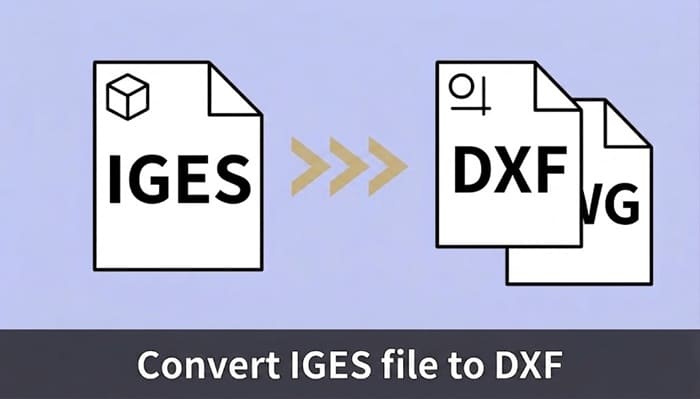
Got an .iges or .igs file that your 2D CAD software refuses to open? You aren't alone.
While IGES is a legacy standard for 3D CAD data exchange, it often causes headaches when you simply need a standard 2D DXF or DWG for AutoCAD, CAM software, or vendor communications.
The quick solution: You don't need to buy expensive 3D modeling software or download heavy applications. You can convert your IGES files to DXF right now using DARE's free online CAD converter.

「取引先が2D CADしか持っていない…」そんな時も焦る必要はありません。
DARE の 3D 変換サービスなら、STEP・IGES・Parasolid などの主要3D形式を、ブラウザだけでサクッと 2D の DXF / DWG に変換可能!
ソフトの追加インストール不要で、今すぐスムーズにデータ共有が完了します。

Engineers and designers typically look to convert IGES to DXF when they run into one of these three roadblocks:
1."Unsupported File Format" Errors: If you are using a strictly 2D environment like AutoCAD LT, it natively lacks the ability to import 3D intermediate formats like IGES directly.
2.Extracting 2D Manufacturing Data from 3D Models: You received a 3D model from a client, but you only need a 2D projection (DXF) to generate toolpaths for machining, laser cutting, or shop-floor documentation.
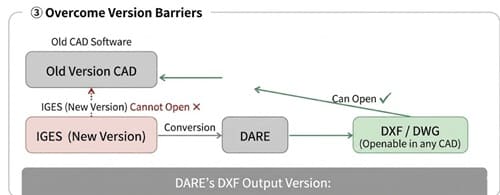
3.Version Mismatches: IGES has different iterations. Older legacy CAD systems frequently fail to read newer IGES files accurately, resulting in blank screens or fatal errors.
Converting your file to a universally accepted DXF or DWG format bypasses all these issues instantly.
To solve these workflow bottlenecks securely, DARE offers an enterprise-grade cloud conversion platform. Here is why professionals trust it over standard, ad-heavy free converters:
DARE is 100% browser-based. Whether you are on Google Chrome or Microsoft Edge, you can upload an .igs file and download a .dxf in seconds. Perfect for quick fixes on a laptop while away from your primary workstation.
Built on decades of CAD interoperability research, DARE's engine minimizes common conversion errors like dropped elements, scaling issues, or corrupted layer structures. You get a clean, editable DXF ready for production.
Skip the complicated workarounds. Here is how to translate your 3D data into usable 2D formats using DARE.
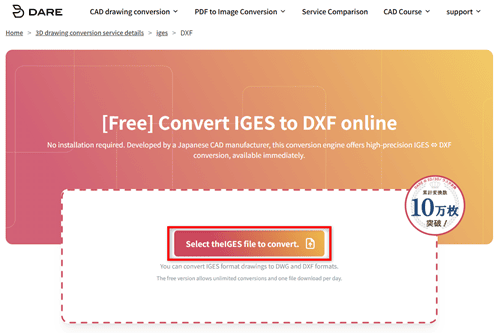
.iges or .igs files directly into the browser window, or click to browse your local drive. Need to batch convert? DARE handles up to 20 files simultaneously.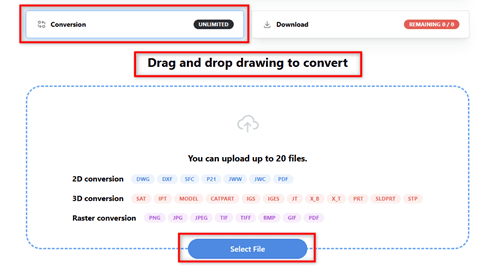
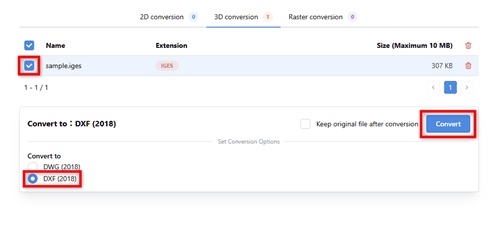
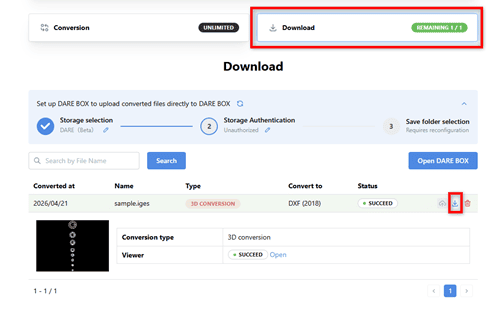
Before you convert, keep these technical characteristics of the IGES format in mind:
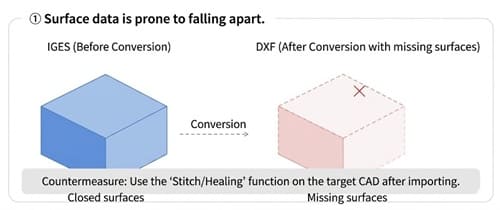
Watch Out for Disjointed Faces
Because IGES represents 3D shapes as a collection of surface data, conversions can sometimes result in "dropped" or unstitched faces. If your resulting DXF/DWG looks fragmented, try using the "Stitch" or "Heal" surface commands in your destination CAD software.
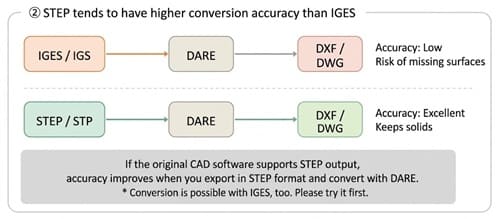
Consider STEP for Higher Precision
If you have the ability to request a different file format from your client, ask for a STEP (.stp / .step) file instead. STEP generally maintains tighter geometric tolerances and solid body data better than IGES. DARE fully supports STEP to DXF/DWG conversions, which often yield superior results.
Overcome Version Barriers
Even if your current CAD software throws a "file version too new" error when trying to open an IGES file, DARE can bridge the gap. By converting the file to a universally readable DXF or DWG format, you can successfully bypass these version restrictions and immediately put your design data to work.
Incompatible CAD files shouldn't slow down your manufacturing or design process. With DARE, you can bridge the gap between 3D models and 2D drafting environments securely, accurately, and entirely in your browser.
Ready to extract that 2D drawing?
>> Convert your IGES to DXF for free right now.