

システムメトリックス株式会社
名古屋市中区丸の内 1-15-20 ie丸の内ビルディング 11F
Tel. 052-232-4040 / お電話による受付時間 平日 9:30-17:00(土日祝休)
© 2026 System Metrix Co., Ltd. All Rights Reserved.
Created Date:2021.08.12
Updated Date:2026.04.13
If you are an engineer or architect, you already know the frustration of spotting a design flaw on the construction site, only to realize your workstation is miles away. Relying on outdated paper blueprints causes communication delays and costly errors.
The solution? Bring your CAD workstation to your smartphone or tablet.
Using dedicated apps like IJCAD Mobile (available for free on iOS and Android), you can easily view, mark up, and manage standard CAD formats like DWG and DXF directly from your mobile device. Here is how you can streamline your on-site workflow and stop wasting time.

DARE はブラウザだけで DWG・DXF・JWW・PDF などを相互変換・バージョンダウンができる無料サービスです。
ソフトのインストールも、面倒な待ち時間も不要。今すぐ変換して業務を再開しましょう!

To stay competitive, you need instant access to your design data. A robust mobile CAD viewer eliminates the lag between the design office and the field.
Say goodbye to manual file transfers. By connecting your mobile CAD app to standard cloud storage providers—such as Dropbox, OneDrive, Google Drive, Box, or WebDAV—you guarantee that you are always looking at the most current version of a drawing. Update a DWG on your tablet, sync it to the cloud, and your drafting team back at the office instantly sees the changes.
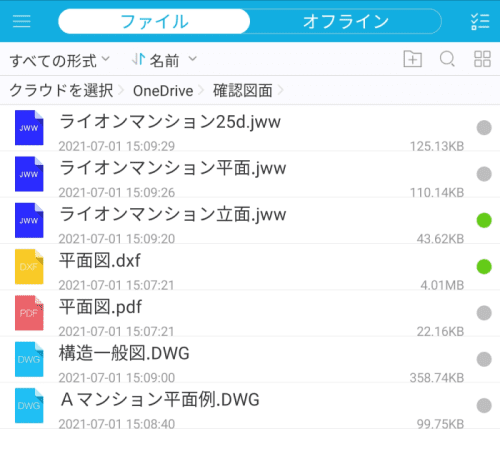
Compatibility issues kill productivity. High-performance apps like IJCAD Mobile natively support industry-standard formats like DWG and DXF without noticeable lag—even when loading complex assemblies or heavy architectural floor plans on a tablet.
Viewing a file is great, but true on-site productivity requires editing capabilities. Modern mobile CAD applications feature intuitive UIs tailored for touchscreens, ensuring you do not need a mouse and keyboard to make critical adjustments.
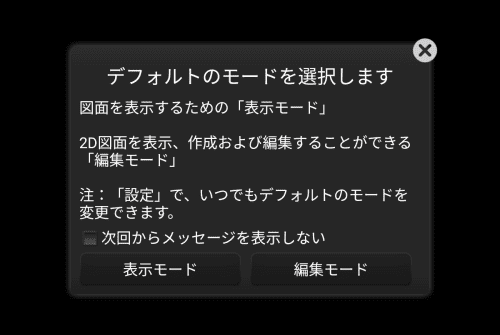
Do not let the small screen fool you. You can execute essential commands directly from your tablet:
Smart features like simulated mouse snapping, point markers, and customized keypads make numerical input and object snapping incredibly accurate, even when using your fingers.
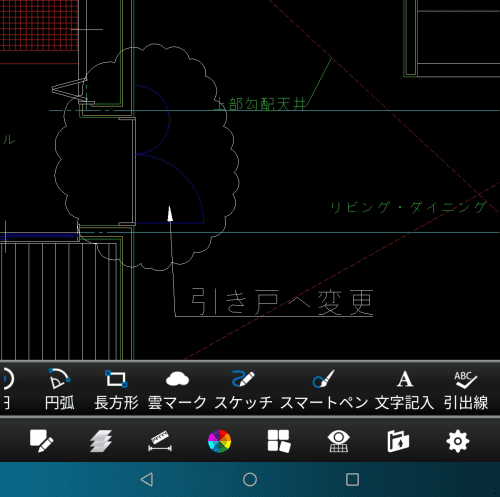
Need to request an urgent design change? Use the Revision Cloud (Revcloud) and Leader tools to highlight the issue and add text notes in seconds. Save the file, sync it to the cloud, and your team can immediately begin the redesign.
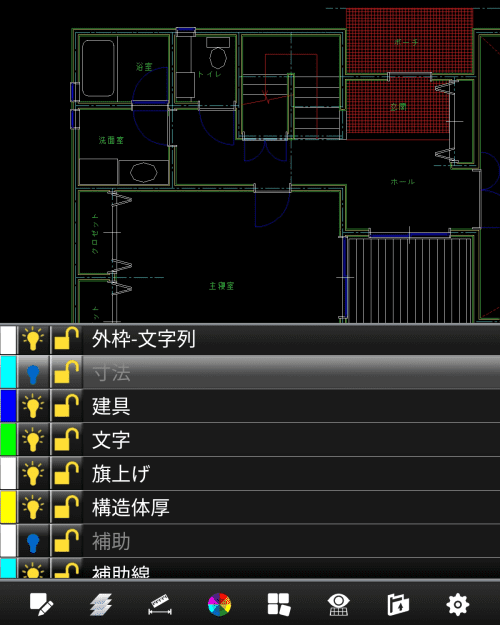
Cluttered drawings are difficult to read on a mobile screen. Take full control of your visibility by turning specific layers on or off, freezing them, or locking them to prevent accidental edits. For instance, you can easily hide dimension layers to get a clearer view of the structural geometry.
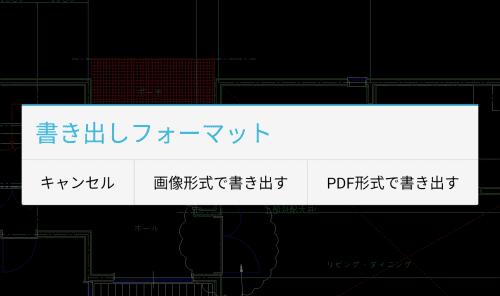
Not everyone on your team has a CAD viewer installed. Once you finish your markups, you can export the DWG file directly to a PDF or high-resolution image format (BMP, JPG, PNG) and email it to clients, contractors, or project managers instantly.
Mobile CAD editing bridges the gap between the design office and the construction site. If you have not integrated a tool like IJCAD Mobile into your workflow, you are missing out on significant time savings and error reduction.
Struggling with CAD Format Conversions Before You Even Reach the Site? Incompatible file versions, missing layers, and garbled text can ruin your workflow before you even open your mobile app. DARE is your ultimate cloud-based CAD conversion platform. Whether you need to batch-convert older DWG files, transform PDFs back into editable DXFs, or standardize your drawing data across different software, DARE handles it flawlessly in the cloud.
[Try DARE for Free Today and ensure your CAD files are always ready for action—anytime, anywhere.]


![[Free] View DWG, JWW, and 3D drawings easily on your smartphone or tablet! [DARE BOX Mobile recommended]](/en/images/recommendService/dareBoxMobile.jpg)
![[Batch convert up to 99 drawings] For large-scale CAD drawing conversion of DWG, DXF, JWW, and PDF, use DARE Converter!](/en/images/recommendService/dareConverter.jpg)










