logo

DARE - CAD File Conversion Service

Norway
For Offline Users

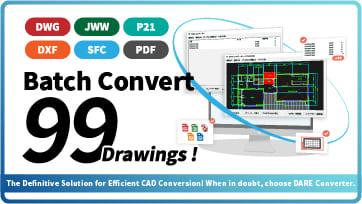
[Batch convert up to 99 drawings] For large-scale CAD drawing conversion of DWG, DXF, JWW, and PDF, use DARE Converter!

Use DARE Converter to convert large quantities of DWG, DXF, JWW, SXF, and PDF drawings! In addition to converting model space, layout space, and raster PDFs, you can batch convert up to 99 drawings at once.

Norway
For Jw_cad Users

[Solve it for free now!] How to convert DWG to DXF without using AutoCAD

DWG files, the standard format for AutoCAD, can only be edited with AutoCAD or AutoCAD-compatible CAD software. However, even without expensive AutoCAD, you can use DARE's free drawing conversion service to convert DWG to DXF for free, allowing you to edit them in CAD software like Jw_cad.

Norway
For AutoCAD Users

Save AutoCAD layout space as JWW [AutoCAD Drawing Conversion Software]

AutoCAD has two workspaces: model space and layout (paper space). When saving in DWG format, drawings from both spaces can be saved. However, DXF and JWW do not have model/layout spaces, so typically only the model space drawing is saved.

Home
  • Terms of service
  • FAQ
  • Contact
  • Operating company
ホーム
/
IJCAD
/
Install

/

Created Date:2021.08.12

Updated Date:2026.04.17

image

How to Get the IJCAD English Free Trial: A Simple Guide

Searching for a high-performance, cost-effective AutoCAD alternative? IJCAD is the leading choice for professionals who need seamless DWG compatibility without the "AutoCAD tax."

While the standard Japanese edition is available for direct download via the dashboard, IJCAD also provides a full 14-day free trial for the English version

Getting your hands on the English trial is a quick and simple process. Follow the steps below to start your evaluation.

目次

  • How to Access the English Trial
    • Step 1: Visit the Official Inquiry Page
    • Step 2: Submit a Trial Request
    • Step 3: Receive Your Direct Download Link
  • Why Test IJCAD?
  • Tired of Version Errors? Optimize Your Workflow with DARE

「開けない図面データが送られてきた…」そんなお悩みを1分で解決

「開けない図面データが送られてきた…」そんなお悩みを1分で解決

DARE はブラウザだけで DWG・DXF・JWW・PDF などを相互変換・バージョンダウンができる無料サービスです。
ソフトのインストールも、面倒な待ち時間も不要。今すぐ変換して業務を再開しましょう!

今すぐ無料で図面を変換する

DARE の機能を詳しく見る

image

How to Access the English Trial

To ensure you receive the correct localized installer and the best support for your region, the English version is provided directly by the IJCAD team. Here is how to request it:

Step 1: Visit the Official Inquiry Page

Navigate to the IJCAD.jp. Don't worry if the main site is in Japanese; you are looking for the "Help Center" link. image image image

Step 2: Submit a Trial Request

Fill out the simple inquiry form with the following details:
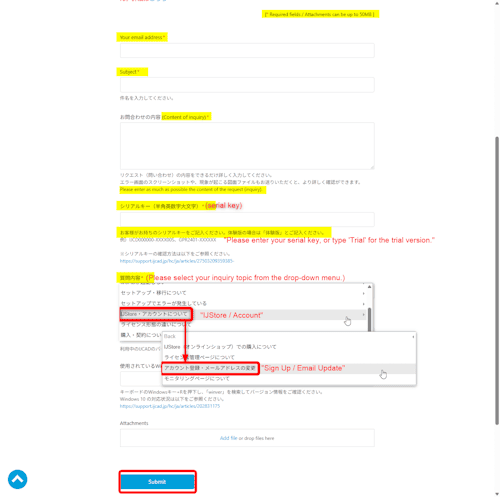
  1. Your email address:
  2. Subject: "IJCAD English Version Free Trial Request"
  3. Content of inquiry: Simply state: "I would like to request a 14-day free trial for the English version of IJCAD ."
  4. serial key: please enter 'Trial'.
  5. select your inquiry topic: "IJStore / Account"
  6. select your inquiry topic: "Sign Up / Email Update"
  7. Submit: Click "Submit"

image

Step 3: Receive Your Direct Download Link

Once your request is processed, the support team will provide you with a direct download link and the necessary instructions to activate your 14-day full-feature trial.

Why Test IJCAD?

Don't let high subscription costs stall your projects. Use your 14-day trial to verify:

  • Command Compatibility: Use the same alias and commands you know from AutoCAD.
  • DWG Fidelity: Ensure your layers, blocks, and Xrefs remain perfectly intact.
  • LISP Support: Run your custom automation scripts without modification.

By trying the English version, you can confirm that the interface and documentation meet your team's professional standards before making any commitment.


Tired of Version Errors? Optimize Your Workflow with DARE

Managing multiple CAD versions or converting PDF drawings can be a bottleneck. If you need to convert files to older DWG versions or turn PDF layouts back into editable CAD data instantly, DARE is the professional’s choice.

[Try DARE’s cloud-based conversion for free and keep your projects moving without file compatibility issues!]


Related Articles

image
How to Completely Uninstall IJCAD on Windows 11 の使い方
image
image

How to use IJCAD

IJCAD Extensions and PLUS Tools

  • JWW
  • PDF
  • Shape

IJCAD Learning

  • Study Methods

IJCAD Plugin

  • Plugin Development

IJCAD Basic Operations

  • Command
  • Line
  • Linetype
  • Line Weight
  • Block
  • Polyline
  • Fill
  • Hatching
  • Text
  • Dimension
  • Scale
  • Layout
  • Dynamic Block

Getting Started with IJCAD

  • What is IJCAD ?
  • Differences from AutoCAD
  • Install
  • IJCAD 2021

How to use CAD

image
CAD starting from scratch の使い方
この CAD 講座を見る
image
DARE の使い方
この CAD 講座を見る
image
Fusion 360 の使い方
この CAD 講座を見る
image
IJCAD の使い方
この CAD 講座を見る
image
Jw_cad の使い方
この CAD 講座を見る
image
AutoCAD の使い方
この CAD 講座を見る

Introduction to DARE's Popular Services

Recent Articles

image
How to Convert Scanned Drawings to Editable DWG Files (Without Retracing) の使い方
image
How to Manage CAD Drawing Files: Ditch the Excel Logs の使い方
image
Convert SLDPRT to DWG Without SolidWorks [3 Steps] の使い方
image
Norway
For Offline Users

[Batch convert up to 99 drawings] For large-scale CAD drawing conversion of DWG, DXF, JWW, and PDF, use DARE Converter!

Use DARE Converter to convert large quantities of DWG, DXF, JWW, SXF, and PDF drawings! In addition to converting model space, layout space, and raster PDFs, you can batch convert up to 99 drawings at once.

Norway
For Mobile Users

[Free] View DWG, JWW, and 3D drawings easily on your smartphone or tablet! [DARE BOX Mobile recommended]

Want to convert DWG to JWW for editing in Jw_cad. /Need to convert JWW to DWG for sending to clients. /Want to convert Jw_cad drawings to PDF for universal viewing.

Norway
For Raster PDF

[Free] Convert raster images to CAD data in just one step.

DARE Scanner vectorizes any image with world-class precision tracing technology! Simply upload an image for automatic analysis and tracing, allowing anyone to easily convert raster images to vector format. The converted vector file can be downloaded in DXF format and edited or modified using CAD software.