Created Date:2021.08.12
Updated Date:2026.04.06
If your current CAD software (like AutoCAD) is constantly freezing, crashing, or taking minutes to open a single file, your computer hardware is likely maxing out. Before you spend thousands of dollars on a new workstation, consider switching your software instead of your hardware.
IJCAD 2026 is engineered to be a powerful, lightweight alternative to traditional, resource-heavy CAD programs. While modern software demands continue to increase, IJCAD remains highly optimized, allowing you to maintain peak productivity without needing enterprise-tier hardware.
Below are the official IJCAD 2026 system requirements, a breakdown of what these specs mean for your drafting workflow, and a quick guide on how to check your current Windows setup.

DARE はブラウザだけで DWG・DXF・JWW・PDF などを相互変換・バージョンダウンができる無料サービスです。
ソフトのインストールも、面倒な待ち時間も不要。今すぐ変換して業務を再開しましょう!

To guarantee a smooth, crash-free drafting experience, ensure your workstation meets the following hardware specifications for the 2026 release.
| System | Recommended / Minimum Requirements |
|---|---|
| CPU | Minimum: Intel Core i5 Recommended: Intel Core i7 or higher |
| RAM | Minimum: 8GB Recommended: 16GB or more Larger RAM may be required depending on drawing file size. |
| HDD (SSD) | 1.82GB or more of free space |
| Supported OS | Windows 11 Version 24H2 64-bit version only (32-bit is no longer supported) |
| Display Card | Recommended: 2GB GPU (Working track record with onboard graphics like Intel(R) HD Graphics 4000) |
| Other | .NET 8 |
If you are experiencing lag, one of the components below is likely the bottleneck. Here is exactly how each piece of hardware affects your 2D and 3D drafting:
Your CPU processes every command, line coordinate, and math calculation. A slow CPU means delayed command execution. For IJCAD 2026, an Intel Core i5 is the absolute minimum for basic office workstations. However, if you want lightning-fast file processing and zero stuttering during complex drafting, upgrading to a high-end Intel Core i7 is highly recommended.
When you open a DWG file, it loads into your RAM. If you run out of RAM, your software crashes. While the baseline requirement is 8GB, professional engineers who keep multiple heavy drawings, XREFs, and web browser tabs open simultaneously should secure 16GB of RAM or more.
The "1.82GB" metric strictly refers to the free space required to install IJCAD 2026. However, do not install modern CAD software on an old HDD (Hard Disk Drive). Always use an SSD (Solid State Drive). SSDs offer drastically faster read/write speeds, which means software boots up instantly and auto-saves happen in the blink of an eye.
IJCAD 2026 has modernized its environment. It now strictly requires Windows 11 (Version 24H2) 64-bit. Legacy operating systems, including Windows 8.1, older Windows 10 builds, and all 32-bit systems, are officially unsupported. Verify your OS version before purchasing a license.
Your GPU handles the visual rendering on your monitor. While IJCAD is highly optimized and can run on basic onboard graphics (like Intel HD Graphics), dealing with dense architectural layouts or 3D elements demands more power. A 2GB dedicated GPU will guarantee smooth panning and zooming without screen tearing.
To boost performance and stability, IJCAD 2026 has transitioned from .NET Framework 4.8 to the newer .NET 8. If your PC lacks this environment, the IJCAD installer will automatically download and configure it for you—saving you the hassle of manual setups.
Don't guess your hardware. You can verify your Windows PC specifications in seconds:
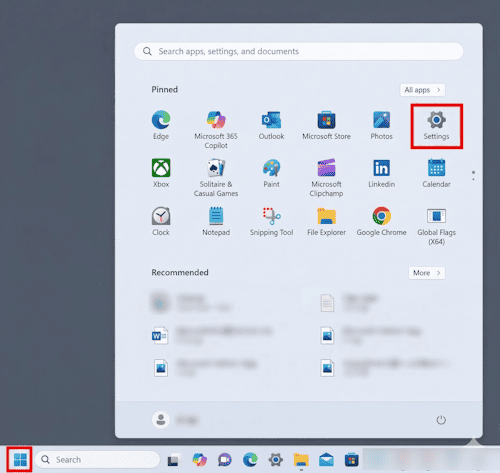
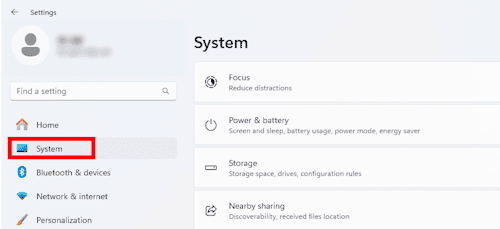
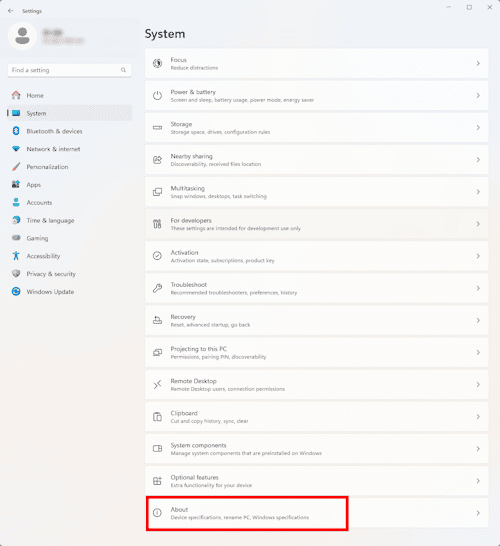
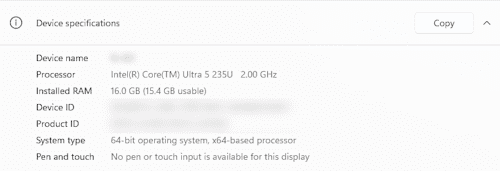
To check your GPU: Type dxdiag into your Windows search bar and press Enter to open the DirectX Diagnostic Tool. Click the Display tab to view your exact graphics card model and memory.
Are you dealing with heavy DWG files, incompatible software versions, or clients sending unreadable DXF or STEP files? You don't always need to install heavy desktop CAD software just to view or convert a drawing.
[DARE] is the ultimate B2B cloud CAD conversion platform built for engineering professionals. Securely convert files right in your web browser—no installation required.
Stop letting software limitations dictate your workflow. [Try DARE's free cloud conversion tools today] and experience professional-grade file translation in seconds!