Created Date:2021.08.12
Updated Date:2026.04.16
Are you wondering how to reduce AutoCAD subscription costs and keep your annual running expenses under control? This common struggle is exactly why many professionals consider IJCAD.
In this article, we will thoroughly explain the differences in licensing models, specifically focusing on the flexible options provided by IJCAD.

DARE はブラウザだけで DWG・DXF・JWW・PDF などを相互変換・バージョンダウンができる無料サービスです。
ソフトのインストールも、面倒な待ち時間も不要。今すぐ変換して業務を再開しましょう!
Since the gradual phase-out of perpetual licenses starting in 2016, AutoCAD has become entirely subscription-based.
A subscription is a licensing model where usage is granted for a specified period. With AutoCAD, you can typically choose between monthly, 1-year, or 3-year terms, and you must renew once the term expires.
Previously, perpetual licenses allowed indefinite use after a single purchase, making them highly cost-effective over the long term. However, compared to subscriptions, their high initial cost made them difficult for individuals and small businesses to afford.
Subscriptions require ongoing payments as long as you use the software, but the upfront cost is significantly lower than a perpetual license, making it accessible even to individuals. While this lowered the initial barrier to entry and expanded Autodesk's user base, the reality is that over a long period, subscriptions often end up costing much more than perpetual licenses ever did.
This is precisely why IJCAD has gained traction as a cost-reduction strategy.
AutoCAD has not only moved exclusively to subscriptions, but it has also consolidated its offerings into "Named User" (single-user) subscriptions.
Under this model, license information is managed on Autodesk's cloud servers. When you launch AutoCAD, the system checks via the network to confirm if your specific user account holds a valid license. If you have it, AutoCAD boots up; if not, or if it has expired, you cannot launch the software.
While this eliminates the need to build and maintain physical license servers within your company—meaning you can use AutoCAD anywhere with an internet connection—it does come with drawbacks.
Most notably, offline activation is no longer possible for standard subscriptions. While you can use the software offline for 30 days once activated online, you must reconnect to the internet every 30 days to verify the license's validity. This can make AutoCAD difficult to use in highly secure, air-gapped environments.
IJCAD is a general-purpose 2D CAD platform that features a very similar operational feel to AutoCAD. Crucially, it excels in reading and writing standard formats like DWG and DXF seamlessly.
While IJCAD has also transitioned primarily to a subscription model, it stands out by offering a wider variety of license formats tailored to different usage needs. You can typically choose from "Single," "Multi," "Network," and even "USB" licenses.
Let’s look at the pros and cons of each license type.
A single license is tied and authenticated to a specific account (user). Unlike older setups tied to one physical PC, this can be used anywhere with an internet connection. IJCAD also offers a borrowing feature for temporary offline use.
The downside is that the license cannot be shared among different users. However, the major advantage is the price—it is significantly cheaper than network or USB licenses, and vastly more affordable than an AutoCAD subscription. If you are an individual professional or a dedicated full-time drafter, a single license is ideal.
A multi-license allows for license sharing via account authentication (e.g., registering up to 5 times the number of licenses you own, accessible on a first-come, first-served basis). A network license manages this sharing via a license server installed within your company's network.
Both formats are incredibly convenient when you have many employees who need CAD access, but only a few use it simultaneously.
The main benefit is the ability to pool and share licenses, drastically cutting down on wasted seats. Disadvantages include the need for an internet connection (for multi-licenses) or the setup and maintenance costs of a local server (for network licenses).
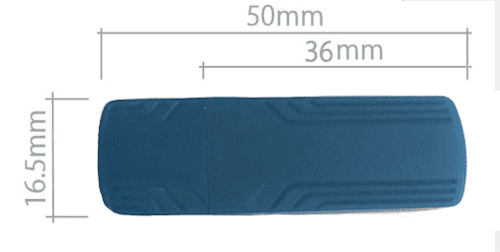
A USB license utilizes a physical USB dongle as the license key itself. By inserting this dedicated USB protector into your computer and launching the software, you can use your CAD program anywhere, completely independent of online or offline status.
The advantage is that sharing a license is as simple as handing the physical key to a colleague. It’s perfect for small teams, fieldwork, or highly secure offline environments.
The primary disadvantage is the risk of physical damage or loss. As a small, physical object, it can be misplaced no matter how careful you are. Additionally, a faulty USB connection could prevent you from launching the software when visiting a client.
It is essential to weigh these pros and cons when selecting your licensing strategy.
We have explored the differences between AutoCAD's licensing and the flexible models offered by IJCAD.
While subscriptions are now the industry standard, understanding the pros and cons of Single, Network, and USB licenses allows you to find the perfect fit for your team's size and usage frequency, ultimately helping you reduce CAD overhead.
Seamlessly Transitioning Your CAD Files with DARE Switching to a new CAD platform to save on licensing costs shouldn't mean struggling with legacy data. If you need to convert a PDF back into a layered DWG, update legacy DXF files, or standardize your drawing assets across a new CAD environment, you need a robust conversion tool.
DARE is a highly accurate, cloud-based CAD conversion service designed for engineering professionals. [Try DARE for free today] and experience seamless, world-standard file conversion that keeps your engineering projects moving forward!