Created Date:2021.08.12
Updated Date:2025.10.03
It is common practice for CAD drawings to have specific rules for line weights. There are various intentions behind this, such as creating well-defined, easy-to-read drawings, or ensuring lines are distinguishable even when printed in black and white. However, have you ever changed a line weight only to find it wasn't reflected in the drawing, or that everything printed with the same line thickness? This article introduces the items you should check when line weights aren't changing.

DARE はブラウザだけで DWG・DXF・JWW・PDF などを相互変換・バージョンダウンができる無料サービスです。
ソフトのインストールも、面倒な待ち時間も不要。今すぐ変換して業務を再開しましょう!
Here are four ways to troubleshoot when you've changed the line weight in IJCAD, but it hasn't changed in the drawing.
The very first thing you should check when line weights won't change is the "Status." In IJCAD, the line weight will not be reflected in the drawing area unless the line weight status is enabled. Since the line weight is disabled by default, check this first if you feel the line weight is not being reflected. To enable the status, click on "Line Weight" on the status bar.
▼ When "Line Weight" is disabled

▼ When "Line Weight" is enabled

When changing the line weight in IJCAD, if the line is too thin or the difference in line weights is too small, you may not be able to perceive the difference even if the line weight has actually changed.
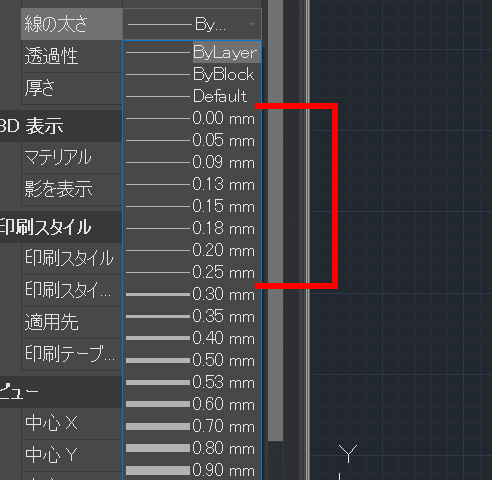
As shown in the attached image, 0.00mm - 0.25mm are all displayed with the same line weight. Also, 0.30mm and 0.35mm, and 0.50mm and 0.53mm are displayed with almost the same thickness. Let's confirm that you have specified the line weight appropriately.
Sometimes, the line weight doesn't change even if you specify it for the layer. This is because, in IJCAD, object properties take precedence over layer properties.
The object below has a line weight property of "1.00mm" and the layer line weight is "0.25mm." In this case, the object property of "1.00mm" is prioritized.
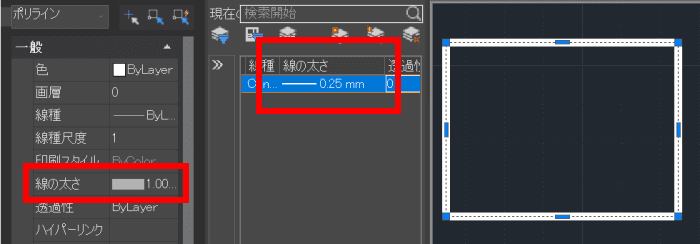
If you want to match the line weight of the layer, set the object's line weight to "ByLayer."
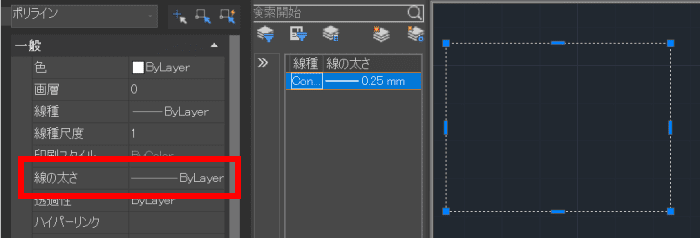
"ByLayer" means to conform to the line weight specified for the layer. When an object is created, the default line weight is "ByLayer." To make drafting and modifications easier, it's best to set the line weight by layer rather than setting it for each object whenever possible.
There is also a priority order within the properties. Polyline objects have two properties that determine line thickness: "Line Weight" and "Global Width" . If the Global Width is "0," the Line Weight is prioritized. However, if it is any value other than "0," the Global Width is prioritized.
The object below has a Line Weight of "1.00mm" and a Global Width of "10."
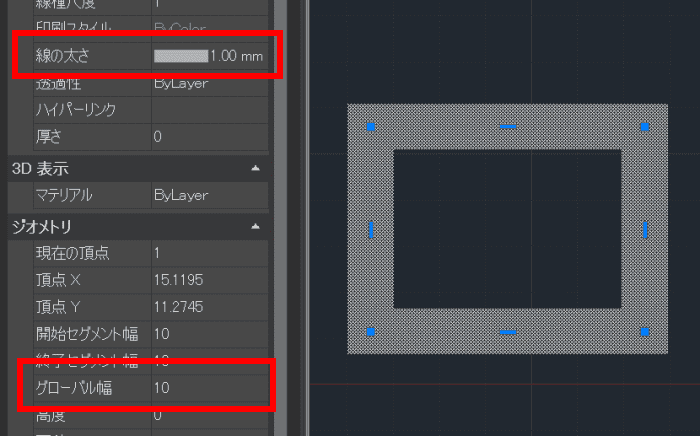
You can see that when the Line Weight is "1.00mm" and the Global Width is "0," the Line Weight is reflected.
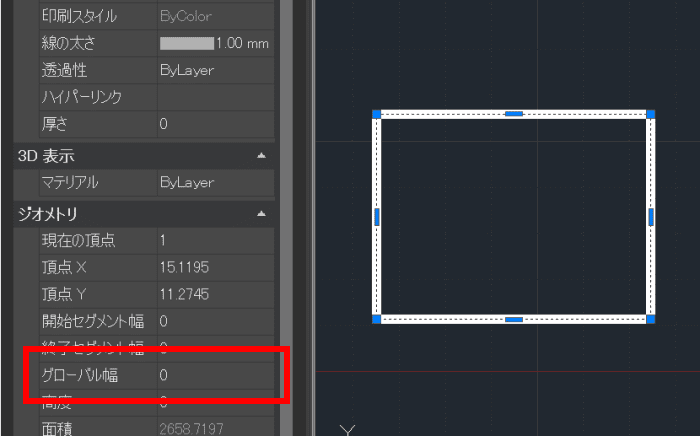
Global Width is a property set when you want to treat the polyline as a plane (filled area) rather than a line. Global Width is affected by the scale, so the thickness of the polyline will differ when printed at 1:1 versus 1:2. Conversely, Line Weight is not affected by the scale, so the polyline will be printed at the same thickness whether you print at 1:1 or 1:2.
Here are the methods for troubleshooting when line weights won't change during printing in IJCAD !
If the line weights do not change during printing, first check whether the line weights are reflected in the drawing itself. If they are not reflected in the drawing, please refer to the section "Dealing with Situations When Line Weights Won't Change in the Drawing Space" above.
If the line weights are visible in the drawing but not when printed, the printing options may be set to ignore line weights. In such cases, open the plot settings using the PLOT command, and check the option "Plot Line Weights" under Print Options before printing.